Recommended WordPress Security Plugin: Wordfence Security

Plugin Name: Wordfence Security

URL:WordPress Security Plugin | Wordfence

Purpose: Wordfence Security is a powerful WordPress plugin designed to protect websites from cyber threats, including malware, hacking attempts, and brute-force attacks. It provides a firewall, malware scanning, and login security to enhance overall WordPress security.

Security Features Addressed

  1. Firewall Protection
    • Blocks malicious traffic before it reaches your website.
    • Provides real-time IP blacklisting to stop hackers.
  2. Malware Scanning
    • Automatically scans core WordPress files, themes, and plugins for malware.
    • Detects suspicious code and helps restore infected files.
  3. Login Protection
    • Limits login attempts to prevent brute-force attacks.
    • Supports two-factor authentication for extra security.
Comparison of Two Popular Passwords Managers

KeePass

URL: KeePass Password Safe

Price: Free

Pros:

  • Completely Free to use
  • No internet connection required
  • Highly customizable
  • Supports multiple databases for different users

Cons:

  • Outdated and less user-friendly
  • No built in-cloud
  • No direct browser integration

Ease of Use:

  • Set up can be complex for beginners due to manual requirements
  • Advanced users will appreciate its high level or customization

Bitwarden

URL: Best Password Manager for Business, Enterprise & Personal | Bitwarden

Price: Free for Personal use/ Premium: $10/year

Pros:

  • Open source with strong security
  • Can be used locally
  • Native browser and mobile app integrations
  • Supports autofill and password generator
  • Affordable premium plan

Con:

  • Requires internet connection
  • Self-hosting required technical knowledge
  • Free version lacks features

Ease of Use:

  • User-friendly with simple setup
  • Self-hosting required advanced setup

Boosting Engagement: Keeping Visitors on NWTC’s Website Longer

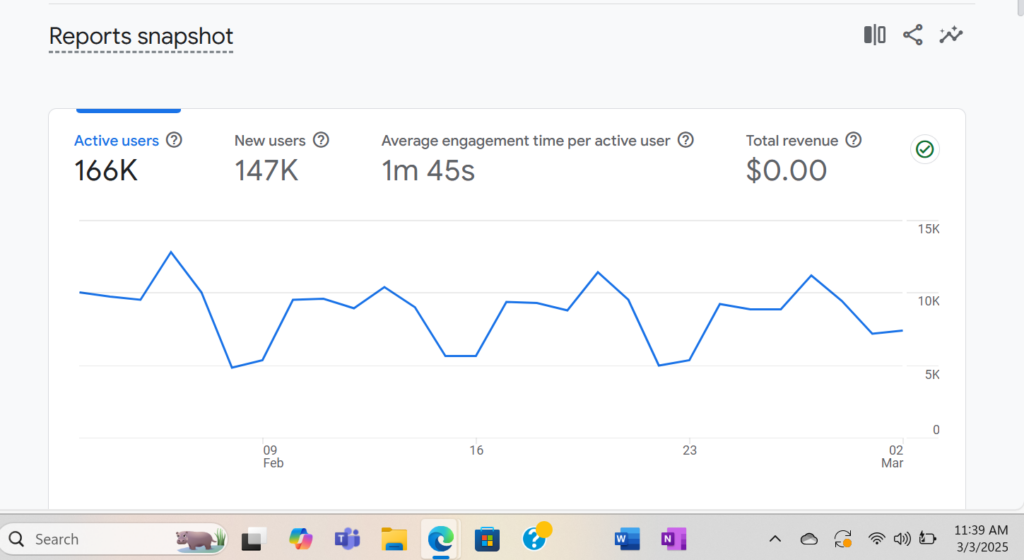
The NWTC website attracts a high volume of visitors, with 166K active users and 147K new users over the past month. However, the average engagement time per user is only 1 minute and 45 seconds. Increasing this time is crucial for providing more value to visitors, improving user experience, and boosting conversion

Recommendations: Enhance Content and User Experience

To keep users engaged longer, NWTC should focus on

  1. Interactive Content – Adding videos, quizzes, and interactive elements to key pages will make visitors stay longer.
  2. Clear Navigation – Improving site structure ensures users find relevant information without frustration.
  3. Engaging Blog Posts & Resources – Providing informative articles about career paths, student success stories, and academic programs keeps users exploring.
  4. Calls to Action (CTAs) – Encouraging users to sign up for newsletters, explore courses, or contact advisors increases engagement.

Why This Matters

  • Higher engagement time means better user experience → Visitors find what they need.
  • Better SEO rankings → Search engines favor websites where users stay longer.
  • Increased conversions → More time spent on the site leads to higher chances of students applying or requesting info.

Maximizing Engagement on NWTC’s Top Pages: Key Strategies for Growth

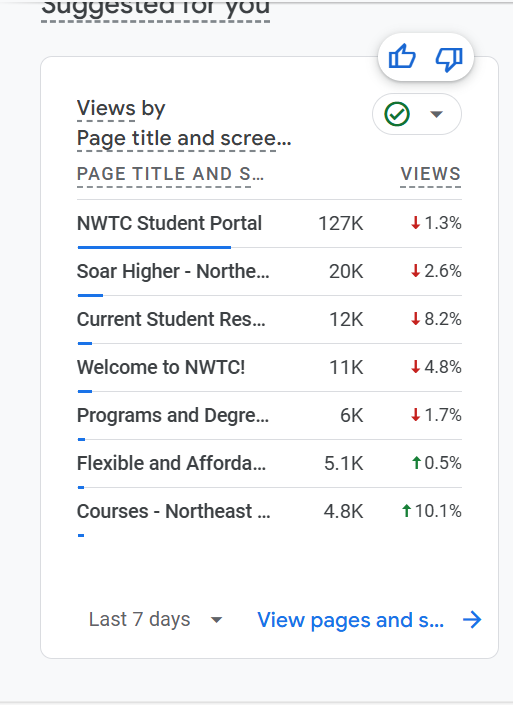
NWTC’s website analytics reveal valuable trends in user behavior. The Student Portal dominates with 127K views, while other crucial pages, such as Current Student Resources (12K views) and Programs & Degrees (6K views), see significantly less traffic. Understanding these numbers can help NWTC refine it’s digital strategy and improve student engagement.

Recommendations to Boost Engagement

  1. Optimize the Student Portal for Greater Interaction
    • Add quick links to underperforming pages to drive more traffic
  2. Increase Visibility of Key Academic Pages
    • Improve SEO with detailed program descriptions, student testimonials, and faculty spotlights
  3. Strengthen Content to Welcome & imformation Pages
    • Improve page with engaging videos and testimonials

By implementing these strategies, NWTC can drive higher engagement across all critical pages, ensuring students and prospective learners find the information they need efficiently.

Optimizing NWTC’s Website: Driving Engagement on Key Pages

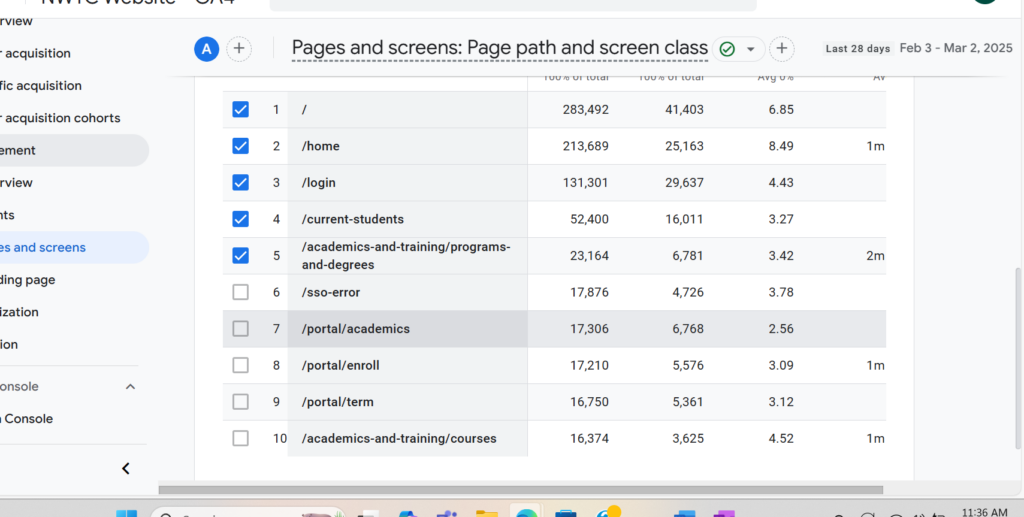
Analyzing NWTC’s website traffic reveals valuable insights into user behavior. Pages like the home page, login portal, and student resources see high activity, but there’s room for improvement in engagement and retention. Let’s explore why optimizing these pages matters and how to enhance user experience

Key Takeaways from the Data

  • The homepage leads with 213,689 visits, but engagement time is only 1 minute on average
  • The login page sees 131,301 visits, suggesting that high student and faculty interaction, yet bounce rates may be high
  • The current students page has a significant 16,011 returning users, indicating it’s a crucial page
  • Academics & Training pages have lower visits and engagement times, suggesting they may need better visibility or usability improvement

How to Boose Engagement & Retention

  1. Enhance Homepage Navigation & Personalization
  2. Increase Visibility of Academic & Training Sections
  3. Encourage More Time on Site

By refining these key areas, NWTC can create more engaging and user-friendly experiences that encourage return visits and deeper interactions

Boosting Returning Users on NWTC’s Website

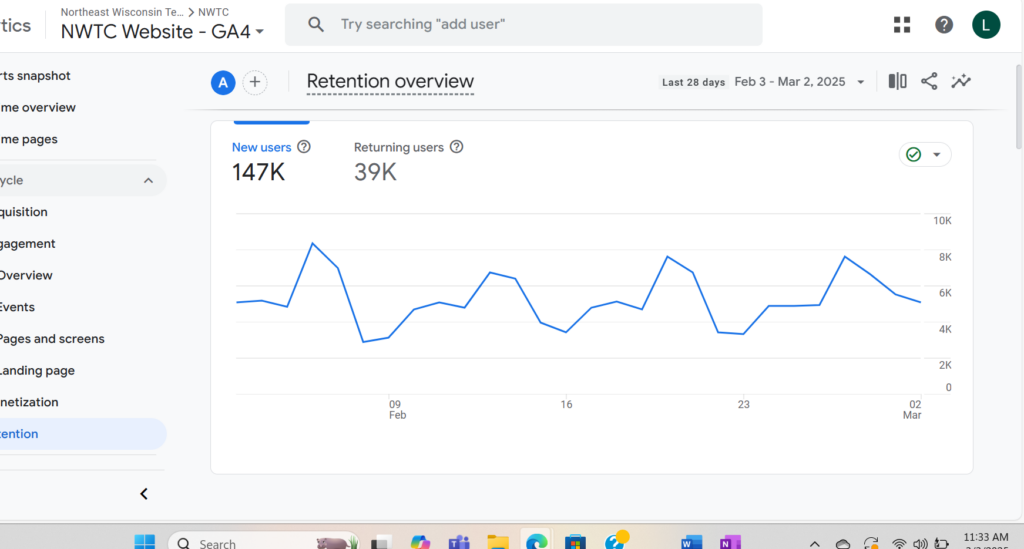
The NWTC website is seeing a strong engagement, with 147,000 new users in the past 28 days. However, returning users sit at 39,000- a clear opportunity for growth. While attracting new visitors is essential, increasing the number of returning users is just as important for long-term success.

Why Returning Users Matter

Returning users indicate that the website provides valuable content, user-friendly navigation, and relevant updates. They are more likely to:

  • Engage with resources (admissions, student services, career opportunities)
  • Enroll in programs or courses
  • Advocate for NWTC by sharing content with others
  • Strengthen NWTC’s digital presence, improving SEO rankings

How to Get More Returning Users

  1. Personalized Content & Reminders
    • Implement personalized dashboards
    • Send reminders about different events
  2. Engaging Blog & News Updates
    • Create blog with student success stories, career tips, and NWTC news
    • Include interactive content such as polls and discussion forms
  3. Exclusive Offers & Incentives
    • Provide offers for engaged users

By focusing on these strategies, NWTC can convert more new visitors into returning users, strengthening engagement and fostering a more connected community.

Kickstart your Tech Carrer at NWTC

Technology is shaping the future—why not be part of it? At NWTC, you can gain the skills needed to thrive in the fast-growing IT field with hands-on, career-focused training. Whether you’re passionate about cybersecurity, software development, networking, or IT support, NWTC has a program to match your goals!

Hands-On Learning – Work with real-world technology & industry tools
Flexible Course Options – Online, in-person, and hybrid learning available
High-Demand Careers – IT professionals are needed in every industry
Affordable & Fast-Tracked – Get job-ready skills in 2 years or less!

🌟 The future of tech is waiting—are you ready to take the leap? Apply today and start building your IT career with NWTC!

Web Design- Certificate

The Web Design Certificate focuses on the front-end design and development of a website. Use HTML, and CSS to design the user interface (UI) while implementing design concepts to enhance the user experience (UX). This certificate is a great fit for design students looking to become a front-end web developer or back-end developers looking to become a full-stack developer. All credits from this certificate can be applied to meet requirements in the Web Development Associate Degree program.

Software Developer- Associate Degree

This two-year program prepares its learners to design, develop and test business application software using various leading programming languages. Graduates will be proficient in HTML, C#, Java, JavaScript, ASP.NET, and SQL along with various supporting technologies in networking, database development, documentation, system analysis and design, and project workflow. Graduates will be prepared to support the software development needs of businesses in a wide variety of industries. Training blends general education development with required IT technical skills. Most classes are offered in an in-person format, and some are also offered online for additional flexibility.

IT Web Programmer- Technical Diploma

The IT Web Programmer technical diploma focuses on the back-end design and development of a website. Use C#, PHP and ASP.NET along with MSSQL and MySQL to design and develop back-end architecture. Develop dynamic web applications that will interact with a database and generate results on a website. This technical diploma is a great fit for programmers looking to become a back-end web developer or front-end developers looking to become a full-stack developer. All credits from this technical diploma can be applied to meet requirements in the Web Development Associate Degree program.

Enroll in Spring Classes Now! Classes Start March 26th

X